USB-C backup for iPhone and iPad

Your photos, on a drive you own.

Gallerya copies the new photos and videos out of your library onto a USB-C drive you plug in. No iCloud, no storage subscription, no account.

Get it on the App Store See how it works

For iPhone and iPad. Free to try: your first 200 items, then $4.99 once.

Gallerya on Product Hunt

A backup in progress — 2,150 items in a minute.

The film

See it in 23 seconds.

A backup, the week after, the archive, Cleanup and reminders — with music.
Your photos pay rent. Every month. Your photos, on a drive you own: no iCloud, no storage subscription, no account. Verified, not assumed: every file is hashed while it is written. One week later, only what is new gets copied; the other 8,213 are already on the drive. A proper gallery, by year and month, albums preserved. Know what is safe to delete. Shall I nag you? “You’ll remember. Probably.” Own the place. Gallerya: Photo Backup — $4.99 once, yours for life. For iPhone and iPad.
What it does

A backup you can hold.

Only what is new

Every run copies only what the drive does not already hold. A second backup right after the first copies nothing — no duplicates, no re-copying 40,000 photos to add yesterday’s.

The originals, not re‑encodes

Full-resolution HEIC, JPEG and RAW. Original-quality video. Live Photo pairs kept together. Edited and unedited versions both.

Verified, not assumed

Every file is hashed while it is written, then size-checked afterwards. Nothing enters the catalog until it has been verified, and you can re-verify the whole archive whenever you like.

Yours to read without this app

Ordinary folders and files, sorted by date, with a plain-text catalog beside them. Any computer can open it. If Gallerya disappeared tomorrow, your photos would not.

Free up space, safely

A green shield means the archive already holds it.
An orange triangle means it is not backed up yet. Freeing space never means losing a photo.

Works completely offline

There is no server and nothing is uploaded. Gallerya has no idea whether you are online — a backup that needs a signal is not a backup you control.

The archive

Everything on the drive, as a gallery.

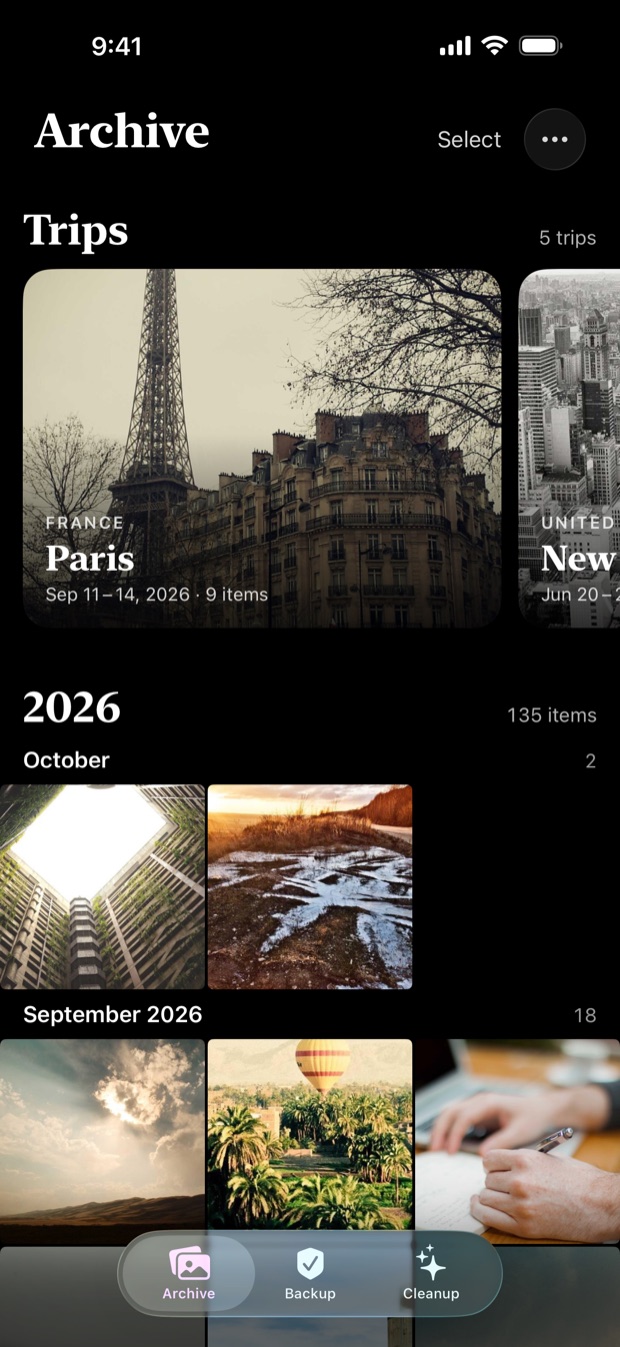
The archive tab reads the drive, not a thumbnail cache of it. Grouped by year and month, with your albums preserved — the ones you made and the smart ones alike — so what you copied is still organised the way you organised it.

Your trips, found on your phone

Above your photos, the archive gathers the times you were away into cards — a city, a country, the dates. Open one to see it day by day. It is worked out on your iPhone from where each photo was taken and a list of cities built into the app, so no location is ever sent anywhere.

Open anything, full screen

Photos straight from the drive at full resolution. Videos play immediately with a scrubbable bar, mute, and 1×, 1.5× or 2× speed — in portrait or landscape.

Share it, or take it back

Share anything out, or copy it back into Photos. Hold a photo to start selecting and do it to a dozen at once. Deleting from your phone to free space was never the end of it.

The Archive tab: trips to Paris and New York City as cards above the photos, which are grouped by month
The Archive, read from the drive, with your trips above your photos.
Cleanup

Free up space without gambling.

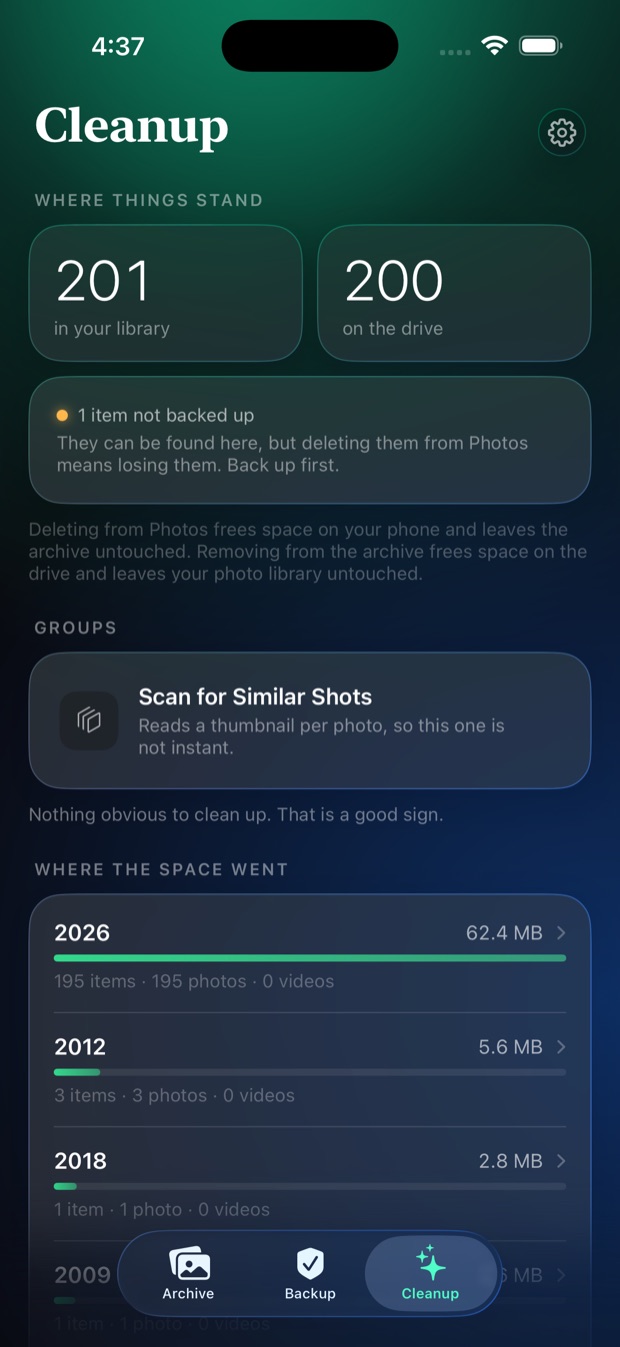
Cleanup finds what is probably worth losing — screen recordings, exact duplicates, similar shots, the large files and long videos eating your storage — and shows you where the space actually went, by year, largest first.

Every item says whether it is safe

A green shield means the archive already holds it, so deleting here cannot lose it.
An orange triangle means it is not backed up yet.

Checked before anything is deleted

By default every archived copy is re-read and compared against its recorded SHA-256 first. One mismatch anywhere cancels the whole deletion. A few seconds, against deleting your only copy of a photo.

Two different jobs, kept separate: deleting from Photos frees space on your phone and leaves the archive untouched. Removing from the archive frees space on the drive and leaves your photo library untouched.

Cleanup showing the library and drive counts, and where the space went by year
What is on the phone, what is on the drive, and which year is filling it.
How it works

Three steps, then it is just a gallery.

  1. Plug in a drive

    A USB-C flash drive, an external SSD, or a memory card reader. Gallerya creates one folder inside whichever folder you pick, and touches nothing else on the drive.

  2. Back up

    It compares your library against the drive and copies what is missing, hashing every file as it goes. You get a figure and an estimate before it starts.

  3. Browse, verify, or free up space

    Your archive as a proper gallery — by year and month, albums preserved, full-screen viewer, video playback with scrubbing. Re-verify it any time, or use Cleanup to delete from your phone what the drive provably holds.

Who it’s for

Wherever the photos pile up.

Travelers

Day three of the trip and the phone is full. Back the trip up to a flash drive in the hotel room — no Wi‑Fi, no roaming data, nothing uploaded — then free up space and keep shooting.

Content creators

Filming every day fills a phone fast. Offload the originals to an external SSD — original-quality video, RAW and Live Photos intact, every file hashed as it is written — before you clear the camera roll for the next shoot.

Instagram users

Edits, exports and saved Reels pile up in the camera roll. Every photo goes to the drive with both its edited and original versions, and Cleanup groups the media saved from other apps, so you can see what is taking the space.

Photographers

Shooting RAW on an iPhone? Every file reaches the drive as the original, never re-encoded, and the whole archive can be re-checked against its recorded SHA-256 whenever you like.

Parents and families

Years of first steps and birthdays, sorted by year and month on a drive you keep in a drawer. Plain dated folders any computer can open, so they outlive the phone — and the app.

No computer at home

No Mac or PC needed. The backup runs on the iPhone or iPad itself, straight to the drive plugged into it — nothing to install anywhere else.

Switching phones

Before the old phone goes back or gets sold, put its photos and videos on a drive you own. Copy anything back into Photos on the new one whenever you want it.

Leaving iCloud+

Stopping a storage plan? Photos that only live in iCloud are downloaded as originals during the backup, so the drive gets the real files, not thumbnails. $4.99 once, against $119.88 a year for iCloud+ 2 TB in the US.

Privacy first

No account, no server, nothing uploaded. Your library goes from your phone to a drive in your hand, and the App Store privacy label says Data Not Collected.

What it costs

Bought once. Not rented.

One payment
$4.99 once
  • Back up your whole library, however large
  • Browse, share and restore anything on your drive
  • Verify the archive against its own catalog
  • Yours for life — no renewal, on every device you own
Monthly
$0.99 a month · Cleanup
  • Delete as much as you like from your phone
  • Remove items from the drive to free space there
  • Find exact duplicates and similar shots
  • Every item checked against the archive first

Free to try, and the free allowance is the real thing rather than a demo: the first 200 items and the first 50 cleanup deletions cost nothing, and whatever Gallerya copies stays on your drive whether or not you ever pay. Cleanup renews monthly until cancelled in your Apple Account settings.

200

items copied in the free allowance, verified byte for byte

Keep your own photos.

No account to make, nothing uploaded, and an archive that outlives the app.

Get it on the App Store Questions? Read the support page